
2026 Edition
URL for this page: quarknet.org/cmsdoc2026.
This document in PDF form: .
CMS WZH 2,4-Lepton Measurement
Created by K. Cecire, T. McCauley, QuarkNet LHC fellows
The CMS WZH measurement is supported for International Masterclasses.
Languages supported: Chinese, Dutch, English, French, German, Hebrew, Hungarian, Italian, Latvian, Polish, Portuguese, Spanish, Turkish
Contents:
- Description
- Requirements for hardware and software
- Outline of the day
- Student procedure
- Presentation of results
- Moderators
Description
- Students use event display of leptonic decays to determine
- final state: 1 electron plus missing ET, 1 muon plus missing ET, 2 electron, 2 muon, 4 electron, 4 muon, or 2 electron and 2 muon (note that lepton pairs should contain one negative matter lepton and one postive antimatter lepton)
- charges of leptons, especially for one lepton plus missing Et
- primary state: W+, W-, W± (indicating electric charge unknown), neutral particle, zoo
- charge if W, using curvature of electron or muon tracks,
- Students use particle counts to find e:µ and W+:W- ratios.
- Students create mass plots. They find the masses of neutral particle peaks in two mass histograms: 2-lepton and 4-lepton. Histograms are fed automatically upon entry of masses.
- Students use the iSpy-webgl event display and the CMS Instrument for Masterclass Analysis (CIMA). Instructional screencasts are available. In addition, we are piloting a Google Sheet option as a substitute for CIMA.
Dataset: There are 100 .ig data files in the iSpy event display. Each file contains 100 events. These files are made up varying mixtures of 1-lepton (plus missing Et) 2-lepton events, 4-lepton events.
Requirements
for hardware and software.
Online:
- Reliable, high-speed internet connection
- Up-to-date version of Firefox, Chrome, Edge, or Safari. Other browsers are also likely to work but please check them before you rely on them.
Offline:
- Not recommended. If you must work offline, contact CMS masterclass coordination.
Outline of the day
This is not a final schedule but a suggersted outline.
- Arrival/Registration (~30 min)
- Cloud chamber, e/m apparatus, or other "gateway experience" apparatus setup for students to inspect
- Start and Ice-breaker activity (~30 min)
- Students in small groups create 1-2 good questions about particle physics and/or LHC. Where practical, groups should be made of students from different schools.
- Mentor presentation
- Template (~60 min, including Q&A)
- Tour of facilities/labs/cool stuff (~45 min)
- Analysis preparation (1-2 teachers facilitate; ~60 min, including Q&A)
- Lunch with a physicist (~60 min)
- Data Analysis (~90 min)
- Pre-conference (~30 min)
- Students and mentor discuss meaning of analysis results.
- Students and mentor discuss questions for other institutes.
- Revisit questions from ice-breaker, discuss which to ask in video conference.
- Designated IT expert preps video connection.
- Videoconference (~30 min)
- Greetings
- Presentation of results
- Discussion of results
- Q&A
- Summing up and evaluation (~15 min)
Student tasks:
- Each pair of students analyzes a set of 100 events
- For each event, distinguish between electron and muon decay and between
- W+ or W- candidate (recorded as "W±" if charge cannot be determined),
- Neutral Particle (Z, H or other "neutral particle" candidate),
- and zoo event (unusual and cannot be characterized).
- Record into the provided CMS Masterclass Google Sheet.
- Important: For each data file, the students who are analyzing that file should open only one instance of their Sheet. Google limits the number of uses at one time to 100 and the sheets respond slower as that limit is approached.
Student procedure
It is important to carefully note the following:
- Mentors and tutors need to be familiar with their CMS Masterclass Google Sheet in order to guide the students successfully.
- The description below is for the current versions of the iSpy event display (iSpy-webgl) and the CMS Masterclass Google Sheet used for the CMS WZH 2,4-lepton masterclass. This is the primary version used in International Masterclasses 2026.
- The legacy iSpy-online is still recommended for the J/Psi-path masterclass. This is described on the CMS masterclass website J/Psi-path page.
Mentors should guide students to follow these procedures for the use of iSpy and CIMA:
Screencast: https://web.quarknet.org/mc/videos/CMSanalysis_20feb2024.mp4. ← needs to be updated
- Pairs of students are assigned sets of 100 events to analyze in iSpy-webgl.
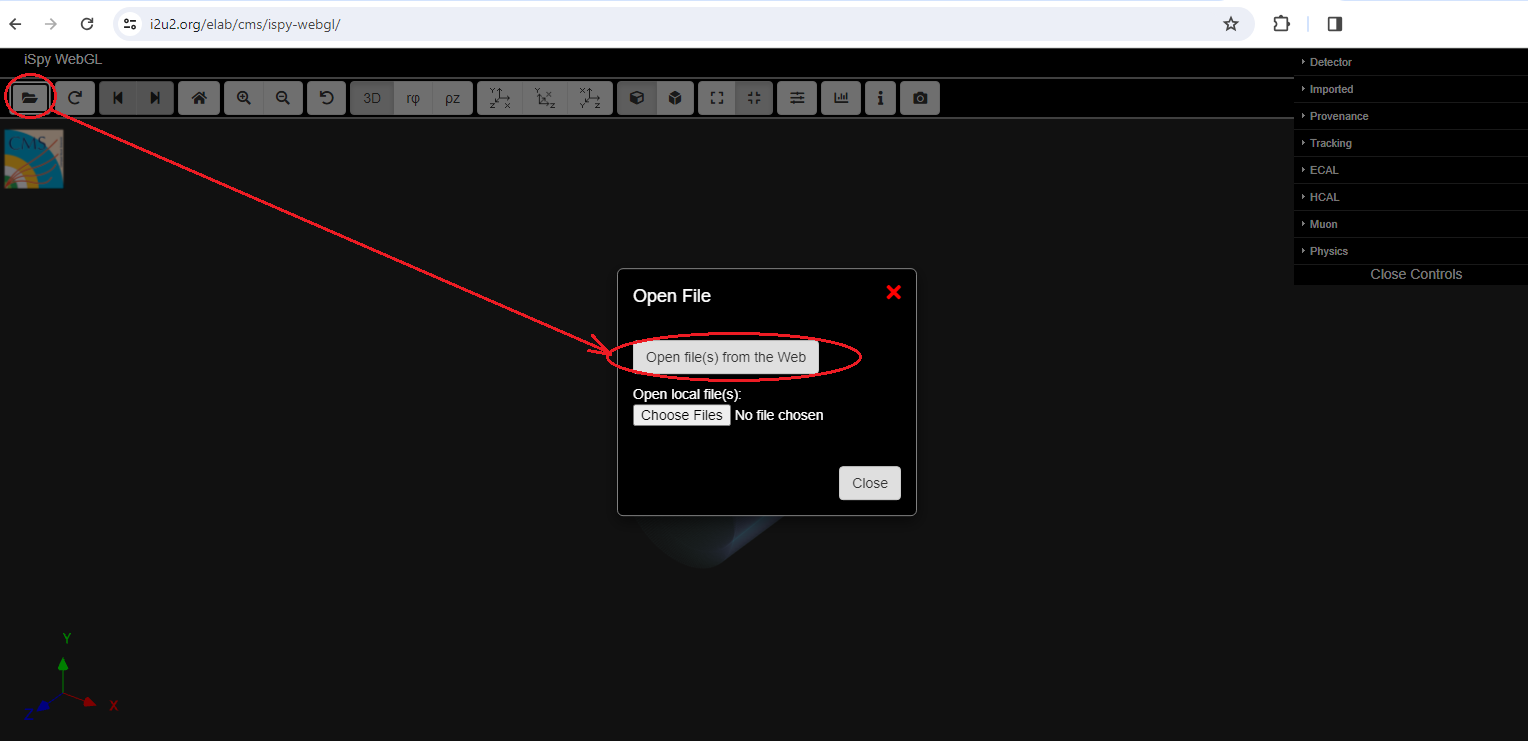
- Event sets are found in iSpy-webgl by choosing the folder icon (top left).
- A first window appears. If the data is to be taken from the internet, choose "Open file(s) from web" in this window. A second window will open.
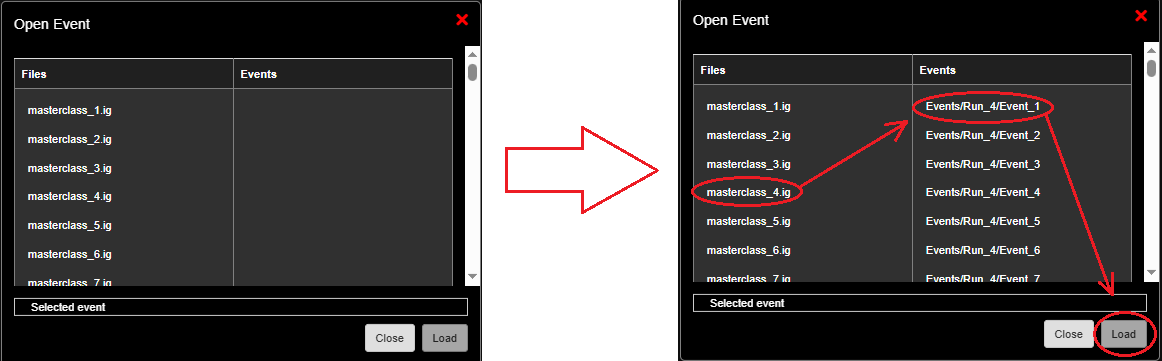
- In the second window, students first choose their data group. They will see a list of data files on the left under "Files" marked as masterclass_1.ig, masterclass_2.ig, etc. They should choose the data set with the number assigned by masterclass leaders.
- After the set of 100 events is loaded, a list of events in that set will appear on the left side of the window. The student chooses the first of these events and then the "Load" button. This will open the first event.
- Students also go to the Google sheet - open only one instance of this per data file. The sheets are found in the table under Data Analysis in the CMS WZH-path Library page. The number of the assigned iSpy file, e.g. "12" for "masterclass_12.ig" can be found in the leftmost column of the sheet, marked "Event File". Most students will need to scroll down to find their data file number.
Find the correct data files in iSpy and the CMS Masterclass Spreadsheet:
After iSpy is open, go the the file folder and, when the pop-up box appears, choose "Open files from web",
A list of data files will appear. Choose the assigned file. Then choose the first event and the Load button. in this case, we have been "assigned" data file 4:
The first event will appear.
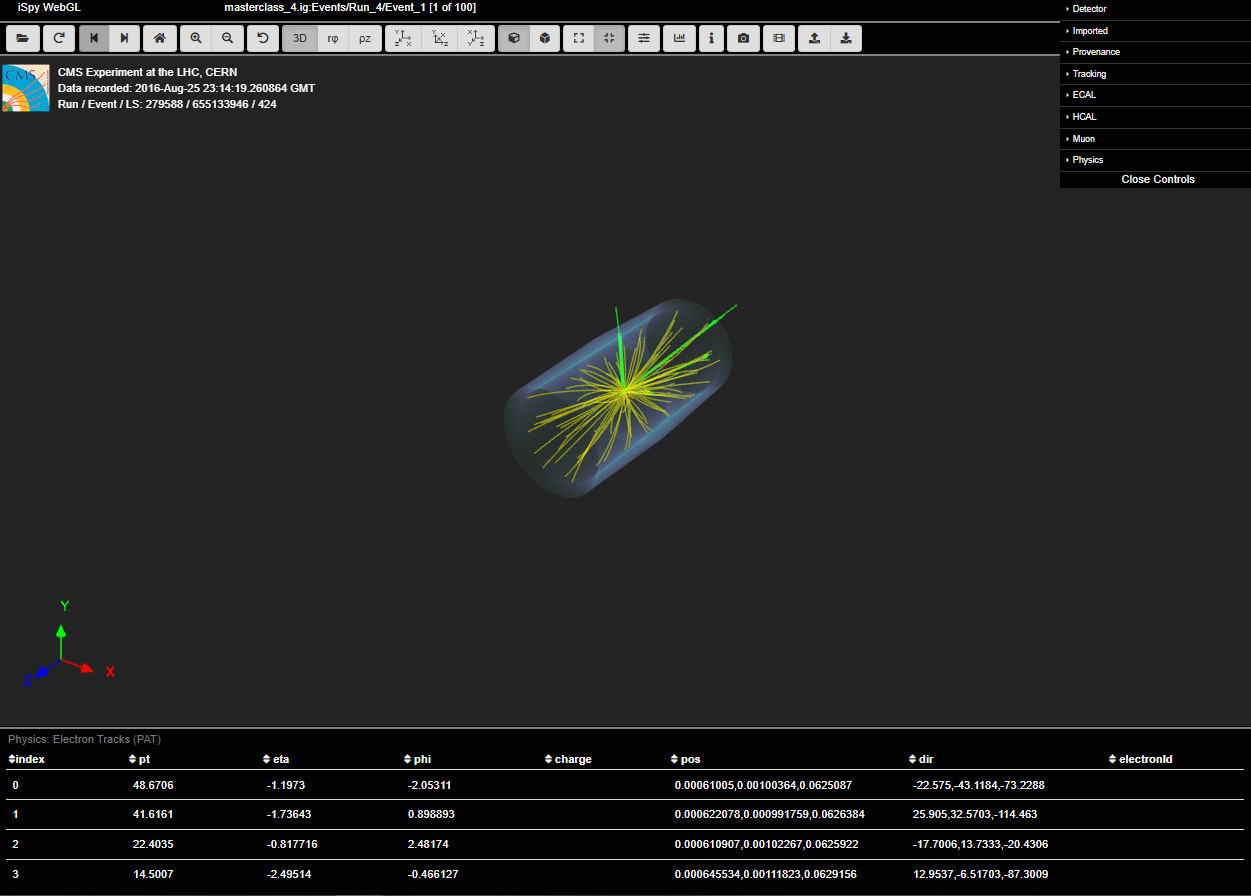
What you see here is many particle tracks emerging from the collision point (event evertex) in the middle of the CMS. The blue cylindrical wireframe represents the Electromagnetic Calorimeter (ECal).The tracker is inside ECal, so the tracks you see are reconstructions of the trajectories of charged particles moving through the tracker. The bright green lines are electron tracks, which end in green towers which represent enery the electrons deposit in ECal. [Note: We generally write or say "electrons" for electrons or positrons unless the distiction is important for a particular part of the analysis; we do the same with "muons".] The other tracks are reconstucted tracks of various lower energy particles which, for our analysis, are background. For controls, we have a set of buttons near the top of the image and and a different Controls column at the upper right.
Let's focus on the buttons at the top. Here are some things we can do, by the numbers:

- Reset to the Orthographic Projection. It is somewhat easier to use in analysis. You can always go back to the current Prospective Projection (button the immediate left) when that works better for you.
- Switch to the Y-X view (looking down the beampipe with the ECal "cylinder" in transverse view, appearing as a circle.
- Zoom in or out to get the best view for analysis.
- Go to the previous or next event.
Now we should set Controls at the upper right:
- Choose Detector. This will expand the Detector controls. Then go to HCal Outer, find "show", and check the box. This adds the outide part of the Hadronic Calorimeter (HCal). The solenoidal magnet and the rest of HCal are just inside this down to ECal. The muons chambers are just outside. HCal Outer is thus a useful demarcation. You may have to Zoom in or out again to get HCal Outer and the area around it firmly in view without making ECal and the tracker too small.
- Expand Tracks and then Tracks (reco.). Uncheck "show" or, alternatively, slide the Opacity way down so these background tracks will not be a distraction.
- Expand Physics and then Missing Et (PAT). Check "show".
- Unexpand everything you expanded in Controls to clear up the view.
Here is what we should now have:
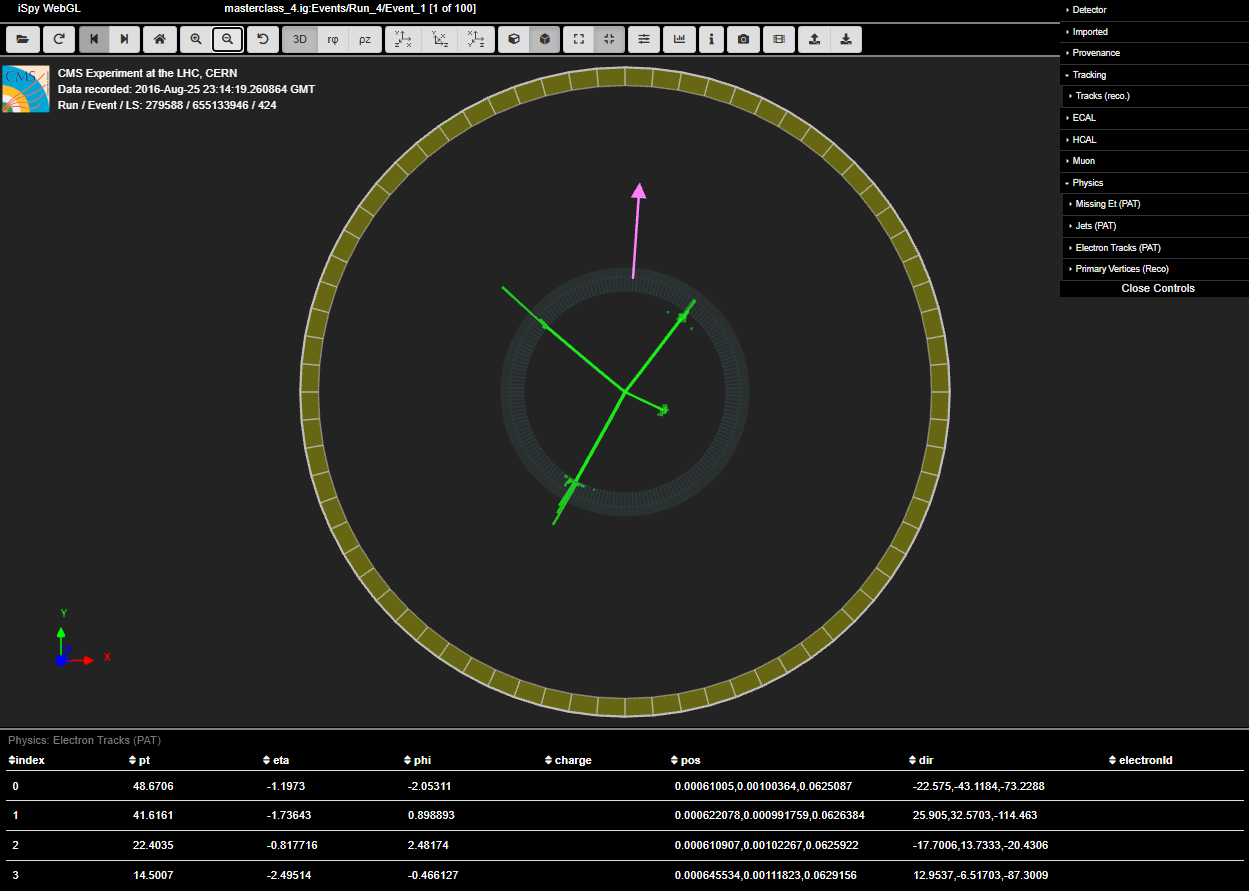
This display shows the final state of the event. It is clear now that there are four electron tracks (green tracks with ECal deposit towers). If you hover your mouse over any one of these, a line in the table at the bottom will be highlighted, showing the kinematics of that particular electron. The column in the table we will use most, when we use it is marked pt and indicated the transverse moment of particles. This is sometimes very useful, as you will see.
The purple arrow appeared when you checked "show" for Missing Et (PAT). This is missing transverse momentum, called Et rather then pt becuase it is traditionally measured using ECal. If you hover over this the table will change and you can find that value under pt.
While there are a few ways to analyze this event, we will go with the most obvious: four electrons (and therefore a Higgs candidate, H → 4e.). If you "click" on each electron, the track will turn gray to show that it has been selected. When you have selected all four, press m on the keyboard and a window will pop up with the mass of the possible Higgs or other parent particle(s). Here is the result:

Is this a Higgs? Maybe. Can it be something else? Maybe. In any case we enter the mass into the CMS Masterclass Spreadsheet. Let's take a side-tour, then, of the spreadsheet.
[CMS Masterclass veterans may wonder, "Where's CIMA?" Well, it is down for IMC 2026 due to server OS issues, so we are using Google Sheets this year.]
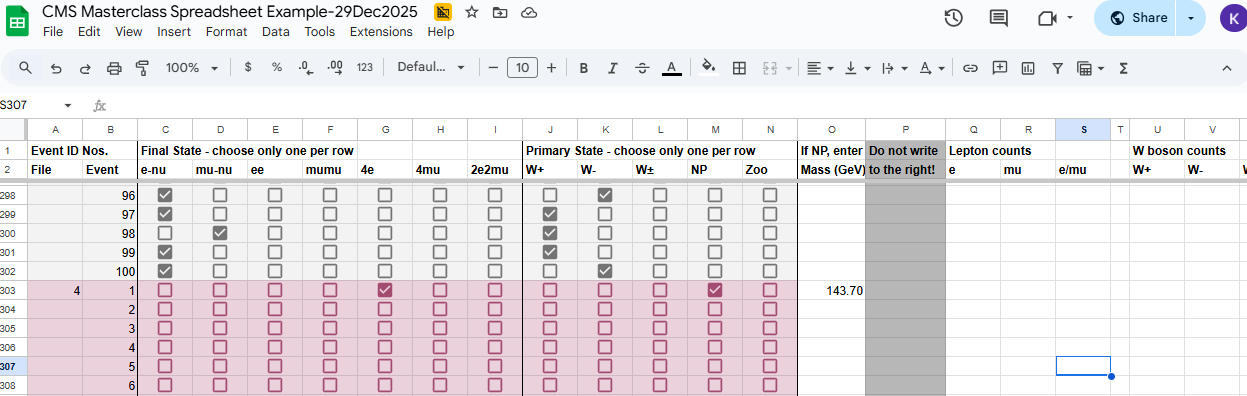
Each group of CMS masterclasses, generally centered around a videoconference on a particular day, will be assigned a CMS Masterclass Spreadsheet. Each masterclass institute will have one "tab" in the spreadsheet for all of its students. Students will generally need to scroll down to find the space for their data file, assigned by the masterclass leader. The number of the data file n - the same number as found in the iSpy data file masterclass_n.ig is in column A of the spreadsheet. Remember that, in our current examle, we are using data fle masterclass_4.ig, so we must find 4 in column A. The individual event numbers are in column B. Here is what it might look like after we have entered this result:
Note: Not all CMS Masterclass Sheets look exactly the same, so the user may need to adapt the same procedure to a slightly different look.
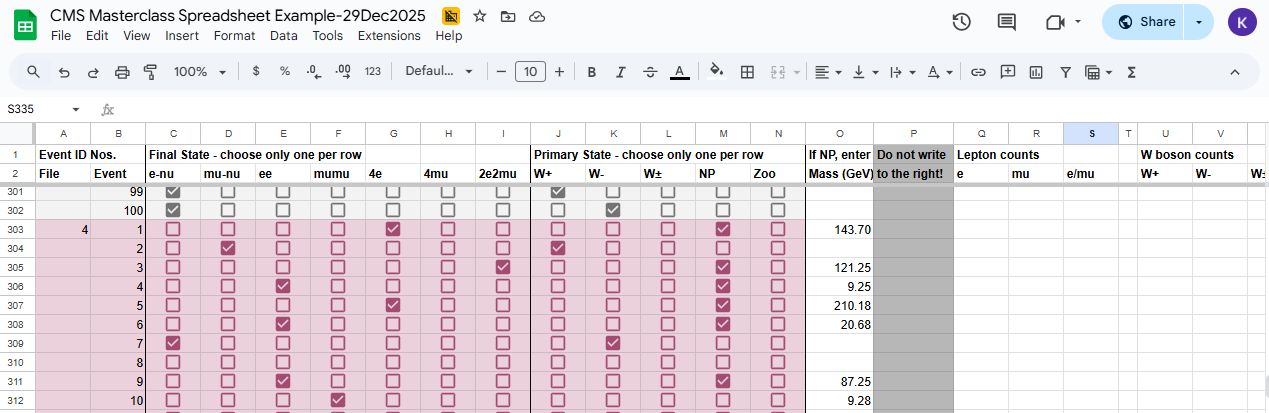
File 4 (purple background) starts on line 303. Note that someone has already filled in results for the data file above - presumably data file 3 but, as this is only an example sheet, don't count on its accuracy. We have checked under 4e because we deemed this to be a four electron event. Thus we did not choose anything else in the Final State columns. (Choose one!) Under Primary State, we chose NP for Neutral Particle - and nothing else under Primary State. Column M is a sort of check: we only enter a mass if NP we choose NP. (No NP, no mass.) We chose NP and entered the mass we found, 143.70 GeV, in Column O. And that is it for event 4-1.
If you are wondering why we have a column marked "Zoo", well, this is for strange events that defy normal classification. Sometimes the column is headed by a question mark (?) instead of the word Zoo but the meaning, for us, is the same.
Note that we do not enter anything, ever, to the right of Column O or P. These columns are where the spreadsheet processes results.
Now let's choose the right arrow button at the upper left to go to the next event, 4-2:
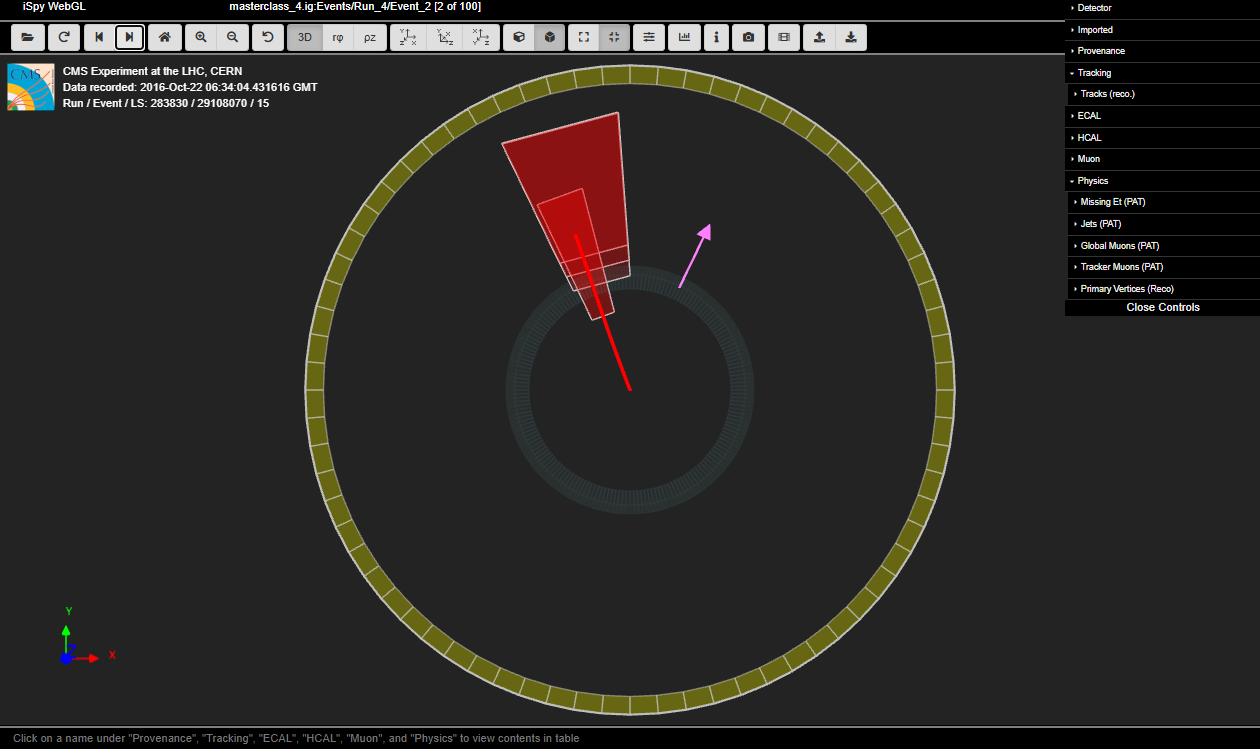
The red track is a muon and the purple arrow is our missing Et. In general, longer red tracks are muon tracks as identified by the analysis software. Note the red boxes: they are muon chambers intersected by the muons. A lepton (muon or electron) paired with missing Et (possible neutrino - undetectabkle by CMS and thus counting a "missing") is usually identified as coming from the decay of a a W boson, in this case W → μν. However, W bosons are charged and that charge is carried by the daughter lepton. Thus, we can find the charge of the W from the charge of the muon. To do this, we take advantage of the strong magnetic field produced inside the CMS solenoid, which will, in the transverse (Y-X) view,
- curve the track of a positively charged particle clockwise from a straight line or
- curve the track of a negatively charged particle anti-clockwise from a straight line.
Looking cargefully, we see that this muon track curves clockwise, so it is positive and thus the W boson ins also positive, that is, W+ → μ+ν. For evetn 4-2 in the CMS Masterclass Spreadsheet, then, we will check mu-nu under Final State and W+ under Primary State and nothing else. We do not enter a mass because we only do this for neutral particles.
By the way, if we look at the side view of event 4-1 in the event display (choose the YZ view button just to the right of the YX view button) and clear the Controls, we can see that this muon track is actually quite long and interects "forward" muon chambers in the CMS endcap to the right:
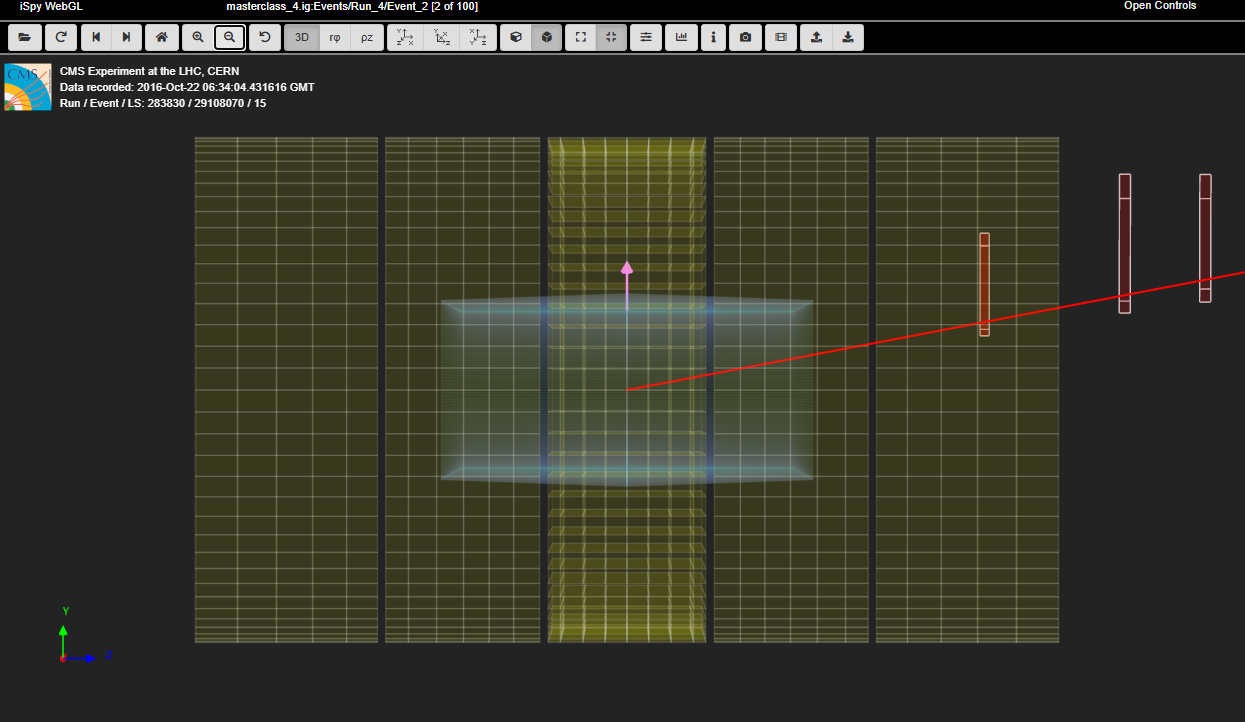
We also see that why the muon track in the transverse view looks so relatively short and that the missing Et really is all transverse.
Skipping ahead to event 4-7, we see something interesting:
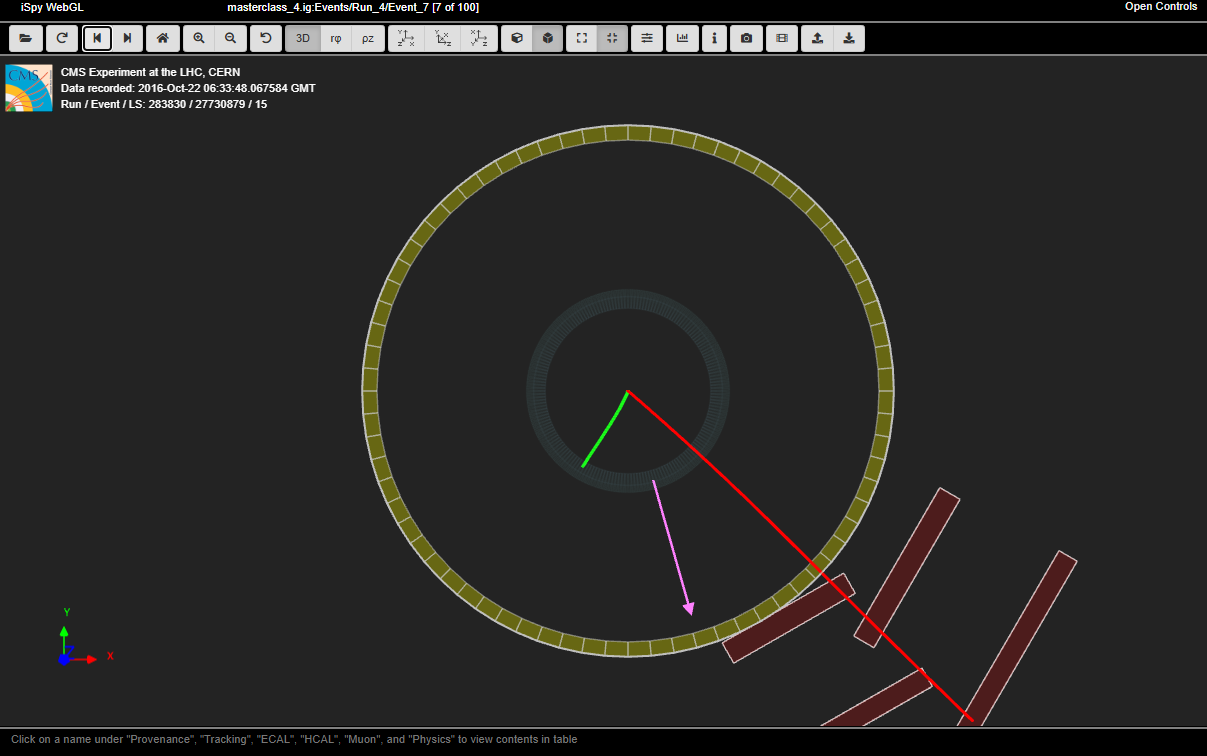
This could be a W → μν or a W → eν, at least by sight. (There is no provision in this analysis for a neutral particle that decays into an electron and a muon.) However, if we hove over each track, we see that the muon (long red track) and the neutrino (missing Et purple arrow) have much higher pt than the electron, so we deem the electron to be less significant. We also note that the muon track curves, again, clockwise, so this event looks to be W+ → μ+ν and we mark it this way in the CMS Masterclass Spreadsheet.
Event 4-8 is a good example of W- → e-ν:
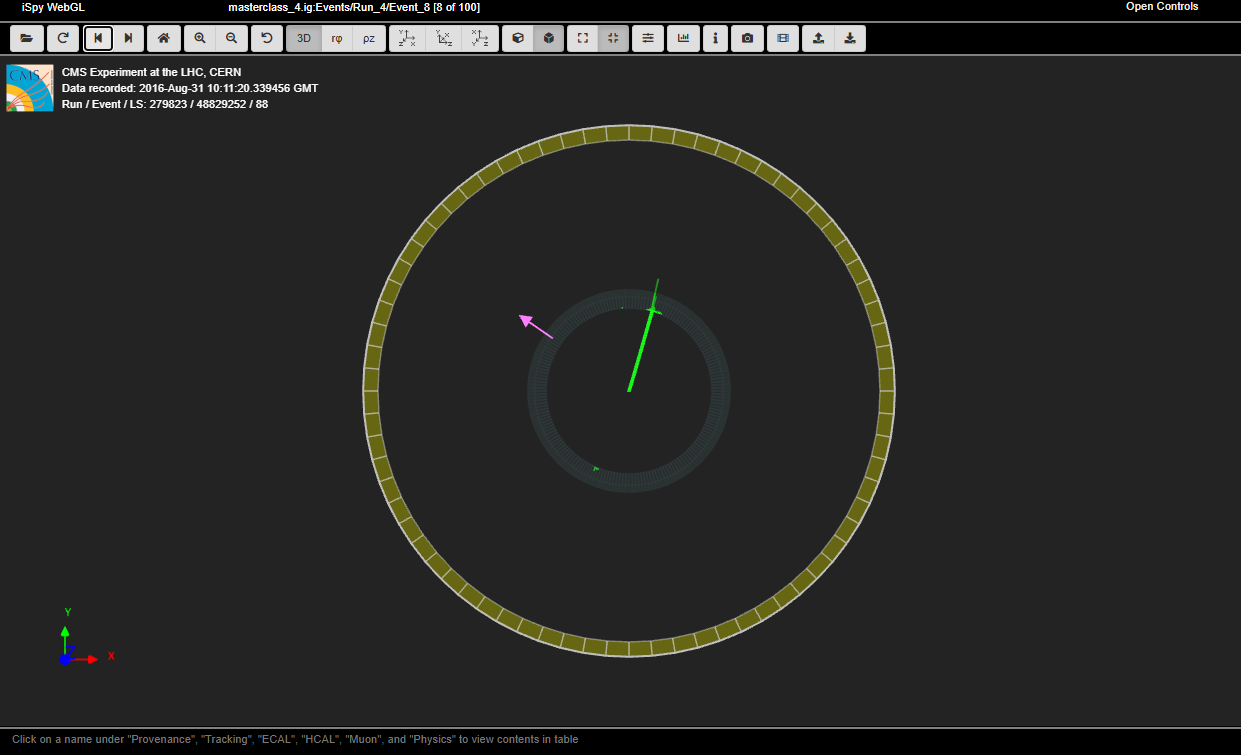
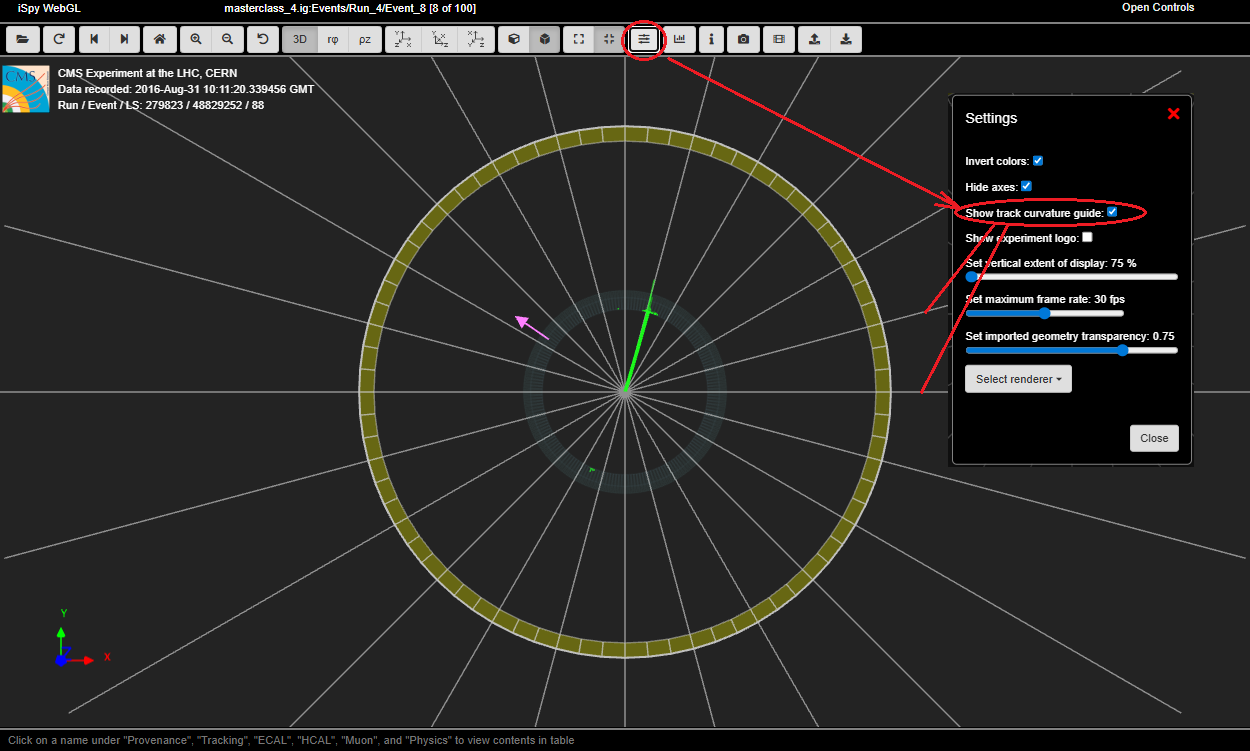
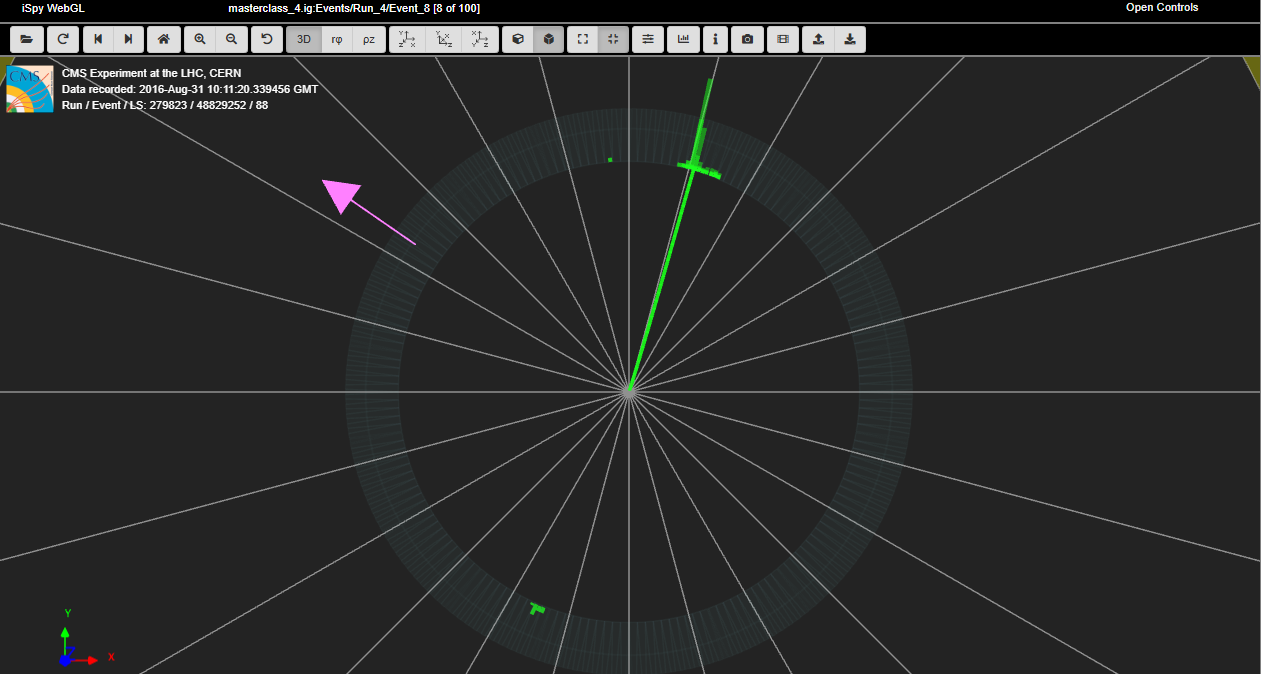
But how do we know this is a W- event? We neesd to see the curvature of the electron track - not easy! One way to help with this is to turn on the track curvature guide. To do this, we choose the Settings button and then, in the pop-up, check Show track curvature guide. This opens a set of radial lines that we can use to to compare the electron track with a straight line:
If this does not help enough, we can zoom in:
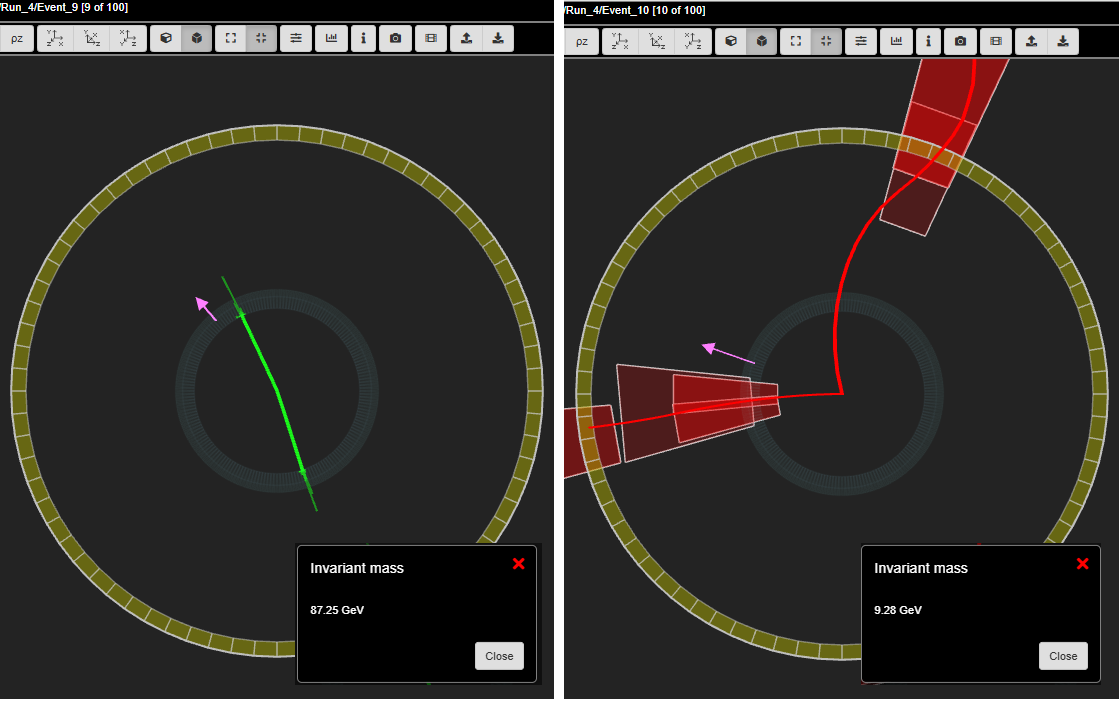
Events 4-9 and 4-10 are most likely two electrons from an 87.25 GeV primary state particle (possible Z boson) and two muons from a 9.28 GeV particle (good upsilon meson candidate):
Here is how events 4-1 through 4-10 were enetered in the CMS Masterclass Spreadsheet:
These results are not the dispositive "right answers". Each event is open to interpretation; it is only in the statistics of as many results as we can get that we see the true nature of what we are trying to discover. You can get a hint of this when we scroll to the top of the spreadsheet where the collected results for the "students" in this example masterclass are found:
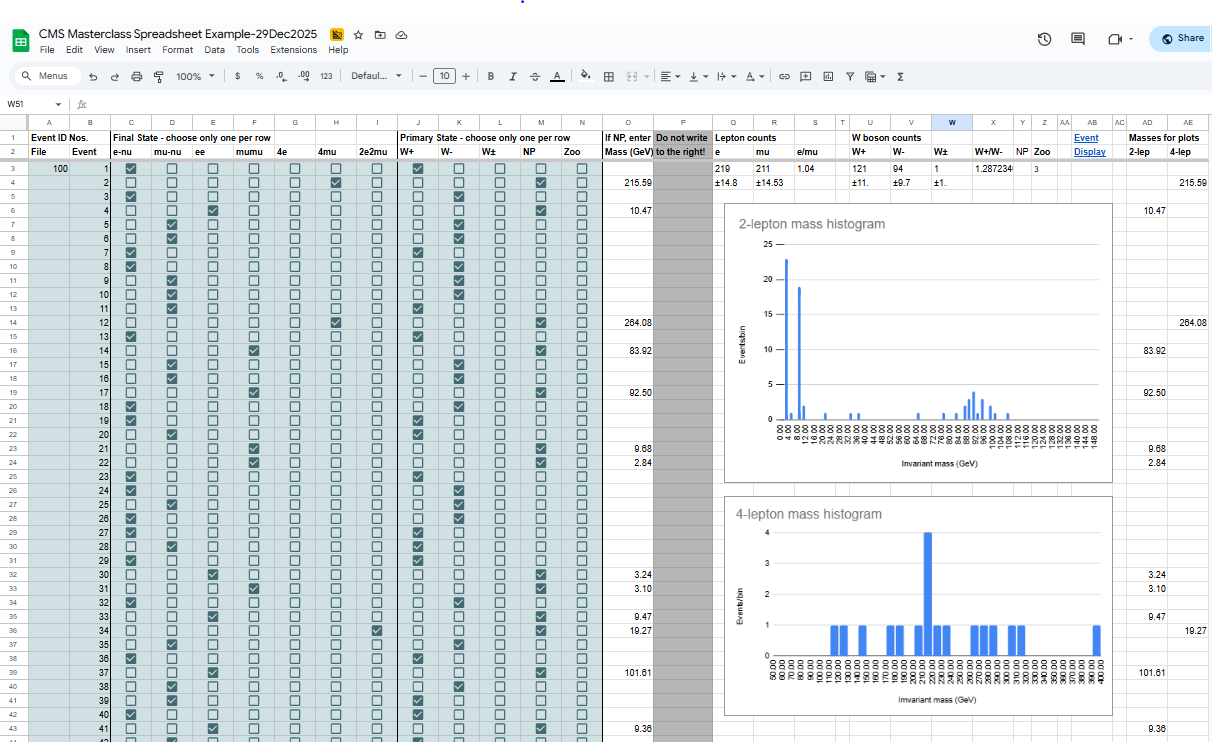
Note: There are numbers all the way to the right! These are not entered directly by users but selected by conditional functions. Please do not overwrite them.
We can focus first on the two histograms. The 2-lepton mass histogram is a mass plot of all the dimuon and dielectron events in 3 data files and little more. It is what we expect, with peaks for the J/psi meson. the upsilon meson and (more weakly) the Z boson pretty much where we expect them. The 4-lepton mass histogram is a mass plot from all 4-lepton events. These are much rarer events and, in our small data set, do not reveal any convincing pattern. (That seeming peak at about 210 GeV represent only 4 events.) These histograms are constructed from the segregated 2-lep and 4-lep data columns are the right, AD and AE.
Under Lepton counts, we have the total numbers of electrons, e, and muons, mu. Under e/mu, then, we have the electron:muon ratio. Similarly, under W boson counts, there are numbers of W+ and W-. We also have W± for events that appear to be W candidates but for which we could not determine the charge. W+/W- gives the ratio of positive to negative W particles we have counted.
In summary, students use event display of (mostly) leptonic decays to determine
- Final state lepton ID (electron, muon). This is to characterize the event, not individual particles.
- If the event has one muon track (long, red) and missing Et (purple arrow) is is a μν event.
- If the event has one electron track (short, green) and missing Et (purple arrow) is is an eν event.
- If it has two muon tracks (actually likely a muon-antimuon pair) it is a μμ event
- If the event has two electron tracks (actually likely an electron-positron pair) is is an ee event.
- If it has 4 short green electron tracks it is a 4e event.
- If it has 4 long red tracks is is a 4μ event.
- If it has 2 short green and 2 long red tracks it is a 2e2μ event.
- Likely particle ID (final state)
- W candidates are cases 1 and 2 above. The charge of the W boson can usually be determined from the curvature of the visible lepton track in the x-y view: positive for clockwise, negative for anti-clockwise. If the curvature cannot be detected then the final state is W±, meaning we cannot determine the charge. In general, if there is only one electron or muon then it's a W candidate.
- Neutral Particles are cases 3-7.
- Cases 3 and 4 are 2-lepton events and their masses should show up in the upper mass histogram. These should always be two of the same kind of lepton but with opposite charge, i.e. ee or μμ.
- Cases 5-7 are in 4-lepton events and their masses should show up in the lower mass histogram. These should be two pairs of same-kind lepton.
- Some events will have multiple lepton tracks plus missing Et. The student can choose a track with the cursor (turning it gray) and a track information will appear in the table below the image in iSpy. The most important of these is transverse momentum, pt. This can be used to distinguish which tracks are important and which are low-energy background.
- Some events are hard to characterize. These rules may help:
- If there is no corresponding ECal energy deposit for an electron track then ignore/discard it
- If there is one electron and one muon then ignore/discard the lower pt lepton
- If there are 3 leptons of the same kind then select one of the pairs of oppositely charged leptons and go with that
- If there are 3 leptons of different kinds then ignore/discard the odd one out
- "Zoo" events are "none of the above" but there can be interesting events among these.
Presentation of results
The mass plots and summary of results are automatically built in the institute (location) Mass Histogram and Results pages. The upper (2-lepton) mass plot will show not only a Z peak but also peaks due to other particles. The results will show the numbers of electron, muon, W+, W-, W± (unknown charge), Neutral Particle candidates, and zoo events plus the key ratios e:μ and W+:W-. The mentor or tutor should project the mass plot and the count/ratio results and discuss their signficance with students. The mentor or tutor should also help the students to generate questions for the videoconference or other later discussion.
Main discussion points from local results in the spreadsheet tab for each masterclass:
- 2-lepton mass plot peaks and patterns
- 4-lepton mass plot peaks and patterns
- electron:muon ratio
- W+:W- ratio.
These are also of importance to videoconference moderators.
Moderators
The following is for all CMS masterclass videoconference moderators. Fermilab-based moderators should also refer to the FNAL Masterclass Moderators page.
Since we will use Google sheets in 2026, moderators must take care to use these tools to the best effect. For most CMS masterclass days in IMC 2026. each CMS masterclass institute will have its own assigned Google worksheet. The results the students put into their institute worksheets then feed into a "master" worksheet which the videoconference moderator(s) use to present combined results to the students.
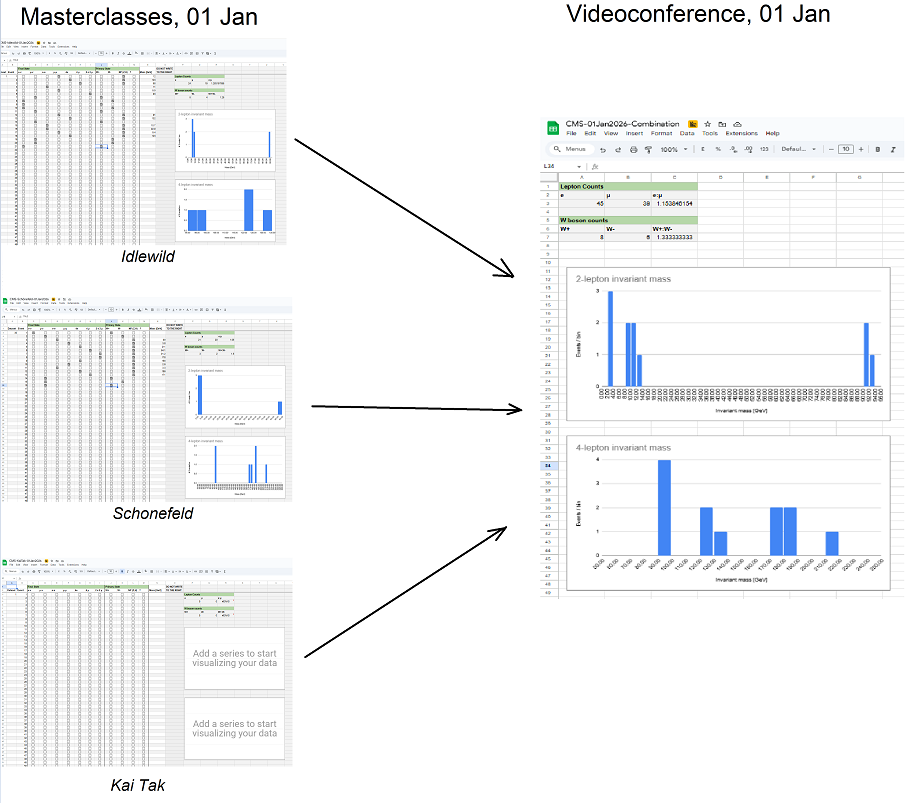
In the illustration above, three CMS masterclass institutes, Idlewild, Schönefeld, and Kai Tak, feed into a Combination sheet for the videoconference. Note that, here, KaiTak has not yet entered results, so you can see what a CMS tabula rasa looks like.
There are some items to note about this Google sheets approach:
- The moderator does not have to do much more than access the Combination sheet.
- Some training with Google Sheets is helpful but not required.
- The moderator or other user can access the sheet and make useful modifications, for example, change bin widths or plot limits. This gives flexibility in presenting results and answering questions.
Interpretation of results
Four results - what they represent and how we got them - are the main points for masterclass leaders to discuss with students after the masterclass measurement using local results:
- 2-lepton mass plot peaks and patterns
- 4-lepton mass plot peaks and patterns
- electron:muon ratio
- W+:W- ratio.
In the videoconference, moderators discuss the same points from combined results from the participating masterclasses that day. For most CERN or Fermilab CMS masterclass videoconferences, the work of students at separate, geographically diverse masterclasses will be in their own assigned spreadsheets. This results then filter into a Combination spreadsheet which the moderators access and share. These are found in the Data analysis table of the CMS WZH-path Library page. Moderators review the results in the Combination Sheet with students and point out important details, such as:
- J/Psi, upsilon, and Z peaks in the 2-lepton mass histogram
- Characteristics of and a possible Higgs peak in the 4-lepton plot
- Corresponding "official" CMS plots.
- Electron:muon and W+:W- ratios. (Expected: ~1.0 and ~1.4, respectively.)
They also field an "ask the physicist anything" Q&A with students.
Here are 2- and 4-lepton plots from a CMS Masterclass Spreadsheet:
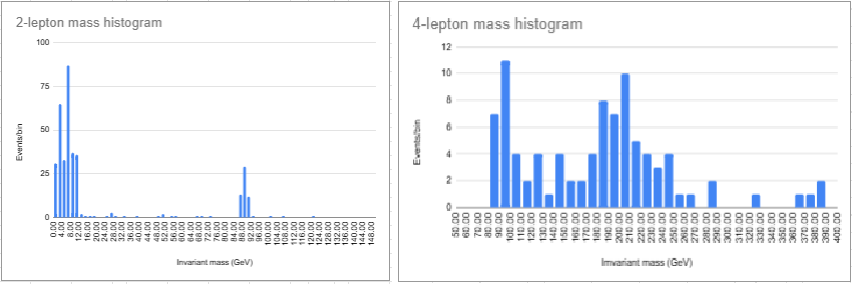
Scanning the 2-lepton mass histogram from low to high mass, we have the following peaks:
- J/psi meson at ~3 GeV
- Upsilon meson at ~10 GeV
- Z boson at about 90 GeV.
Scanning the 4-lepton mass histogram from low to high mass, we see these peaks:
- Z boson at about 90 GeV - these are either a Z radiating a photon, where the Z and the photon both decay to two leptons or off-shell ZZ.
- Possible Higgs at ~125 GeV but with too small a peak to reach a conclusion.
- Another peak, likely background, also small at ~145 GeV: this provides a good example of the "look-elsewhere effect" that re inds us not to be too sure of our peak at ~125 GeV.
- A large peak starting at ~180 GeV and spilling forward to higher masses. These are likely ZZ events, where two Z bosons were created coincidentally.
A note on the histograms: To make the combined results more understandable to students, you may want to change the bin width. This screencast shows how: https://cern.ch/bin-imc2026.
Moderators should guide students to these results and compare them with the published CMS results to compare with student results.
Discussion of ratios:
- The e:mu ratio should come close to 1 as an example of lepton universality: nature does not prefer one flavor of lepton over another.
- The W+:W- ratio is expected to be around 1.2 to 1.6, meaning more W+ than W- events. This is because the W bosons are created from proton collisions of valence quarks (two positive up quarks to one negative down quark) and sea quarks in the proton (random distribution of quark types and thus electric charges).
Sample questions
In discussion, the moderator might ask students
- How many peaks are there in the 2-lepton mass plot?
- Where is the Z peak? What is the mass of the Z boson?
- What do the other peaks mean?
- Is there a Z-peak in the 4-lepton plot? If so, why?
- What else can we see in the 4-lepton plot. Is there evidence of the Higgs boson? What else?
- What is the ratio of electrons to muons? Is it close to what we should expect?
- What is the W+:W- ratio? What should it be?
In the videoconference, students might ask questions like
- Why are the widths or heights or numbers of peaks different from one Institute to the next?
- Why do different Institutes get different ratios? How did they identify electrons or muons or W candidates or Z candidates or zoo events? How did they measure charge for W candidates?
- With the Tevatron shut down, what do you do at Fermilab?
- Is it boring at CERN when the LHC is not running?
- Why did you become a physicist?
...and better questions which only students can create.